Financial Systems Account Segments Tab
For district's using LINQ ERP, LINQ ERP NC, or V6, use the Account Segments Tab to define the account number format.
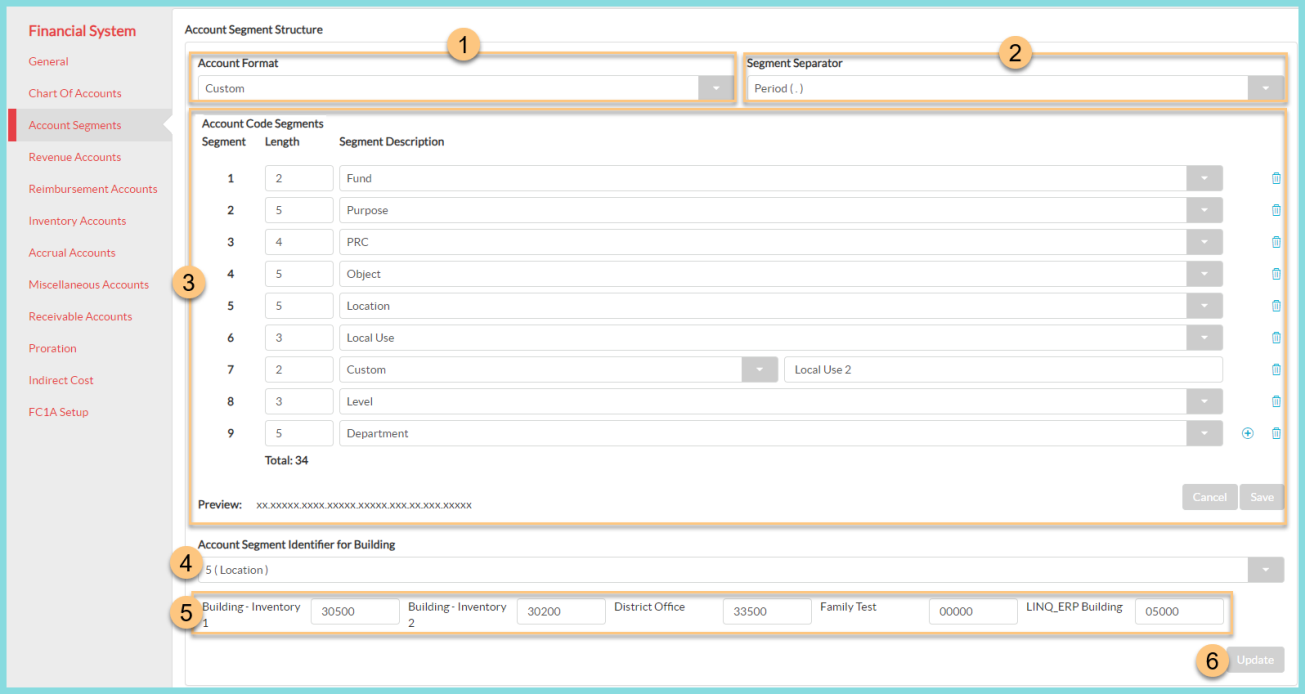
-
Select an Account Format.
Default: Custom -
Select a Segment Separator.
Options: Period, Dash, or Comma -
Define the Account Code Segments.
Note: View the Response Data for an Account Import on the Financial System Integration Events screen as a reference.-
Enter the character Length for each segment.
-
Select a Segment Description.
-
Click + to add a new segment.
-
Click the Trash Can to delete a segment.
-
Click Save to save your Account Code Segment configuration.
-
-
Select the Account Segment Identifier for Building.
-
Enter the account number segment for each building.
-
Click Update to apply your changes.